# Pixel-DSL: Prototyping Game Assets With a Tiny Language
Table of Contents
Pixel-DSL: Prototyping Game Assets With a Tiny Language
Every time I start a small game, I hit the same wall before I write a single line of gameplay code: I need assets. A player sprite, a coin, an enemy, a tile. And I am not an artist. Opening a pixel editor, picking a palette, and nudging individual pixels around kills the momentum I had when the idea was still fresh.
So I built Pixel-DSL: a small language where you describe a sprite in a few lines of text and it compiles to a PNG.
The goal was never to replace a real artist. It was to get a placeholder on screen fast enough that I could keep building.
The Idea
Instead of placing pixels by hand, you write a sprite definition:
palette nes {  black k #000000  white w #ffffff  red   r #ff3030}
sprite flag 16x12 palette=nes {  fill k  circle 8,5 3 w  rect 6,7 9,7 w  line 4,9 11,11 w  flip h}
You declare a palette, give each color a short name, then build the sprite out of shape operations: fill, rect, line, circle, pixel, flip. That’s the whole mental model. A few lines in, a PNG out.
npm install -g @pixel-dsl/clipixel-dsl build flag.pix -o flag.png --scale 16A Few Sprites
Every one of these is a .pix file compiled to PNG with the CLI. No editor, no mouse. They live in examples/ and there’s a full gallery at pixel-dsl.com.
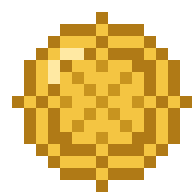


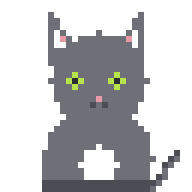
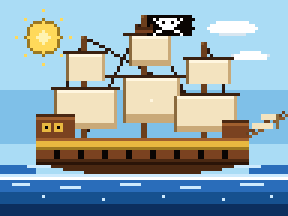
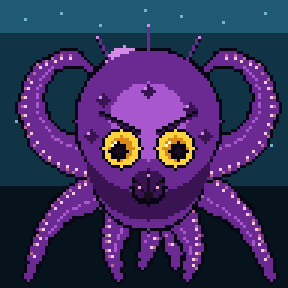
The kraken is 96×96 and still just a list of shape ops.
Why a DSL Instead of Just Drawing?
Two reasons drove the design.
Determinism
The same source always compiles to byte-identical output. parse → render is a pure function with no randomness and no platform drift. That means sprites live happily in version control. A diff to a .pix file is a diff you can actually read. For a solo project where the assets evolve alongside the code, that matters more than I expected.
LLM-friendliness
This is the part I care about most. The grammar is small enough to drop straight into an LLM system prompt, which means a coding agent can draw for me.
The catch is that you can’t just hand an LLM a raw pixel grid and ask it to edit it. It miscounts a cell, the row alignment drifts, and the whole sprite skews. Compact shape ops sidestep that entirely. Here’s the same Jolly Roger flag written both ways.
As a cell grid, it’s 192 tokens you have to keep perfectly aligned:
sprite jolly 16x12 palette=flag { k k k k k k k k k k k k k k k k k k k k k w w w w w w k k k k k k k k k w w w w w w w w k k k k k k k k w w k w w k w w k k k k ... 8 more rows}As ops, it’s 10 statements that say what they mean:
sprite jolly 16x12 palette=flag { fill k rect 1,1 14,10 k circle 8,5 3 w pixel 7,4 k pixel 9,4 k rect 6,7 9,7 w line 4,9 11,11 w line 11,9 4,11 w rect 5,11 10,11 r}Identical output. But “put a circle at 8,5 with radius 3” is something a model gets right every time, while a wall of grid characters is something it eventually fumbles.
So Pixel-DSL ships with a skill you can install into your agent:
pixel-dsl skill install # Claude Codepixel-dsl skill install agents # any AGENTS.md tool (Codex, etc.)It teaches the agent the full grammar, the shape ops, and the CLI. After that I can just say “make me a red mushroom sprite” and get a .pix file back that I can tweak by hand if I want to.
Using It in Code
If you’d rather render sprites at runtime, the core library is separate from the CLI:
npm install @pixel-dsl/coreimport { parse, render } from '@pixel-dsl/core'
const { ast, errors } = parse(source)if (ast) { const png = render(ast, { scale: 16 }) // Uint8Array of PNG bytes}It runs the same in Node and in the browser, so the project also has a small playground for live editing.
Where It’s At
It’s one TypeScript monorepo:
@pixel-dsl/core: the parser and deterministic PNG renderer@pixel-dsl/cli: thepixel-dslcommand-line compiler
Even the project logo is a .pix sprite, which felt like the right way to dogfood it.
It scratches my own itch today, but if you’re building small games, tinkering with LLM-authored content, or just like the idea of source-controllable pixel art, I’d love for you to try it and tell me what breaks.